Put Your Claw Agent in a Tank: Tank OS, Agentic OS, and How to Try It Today
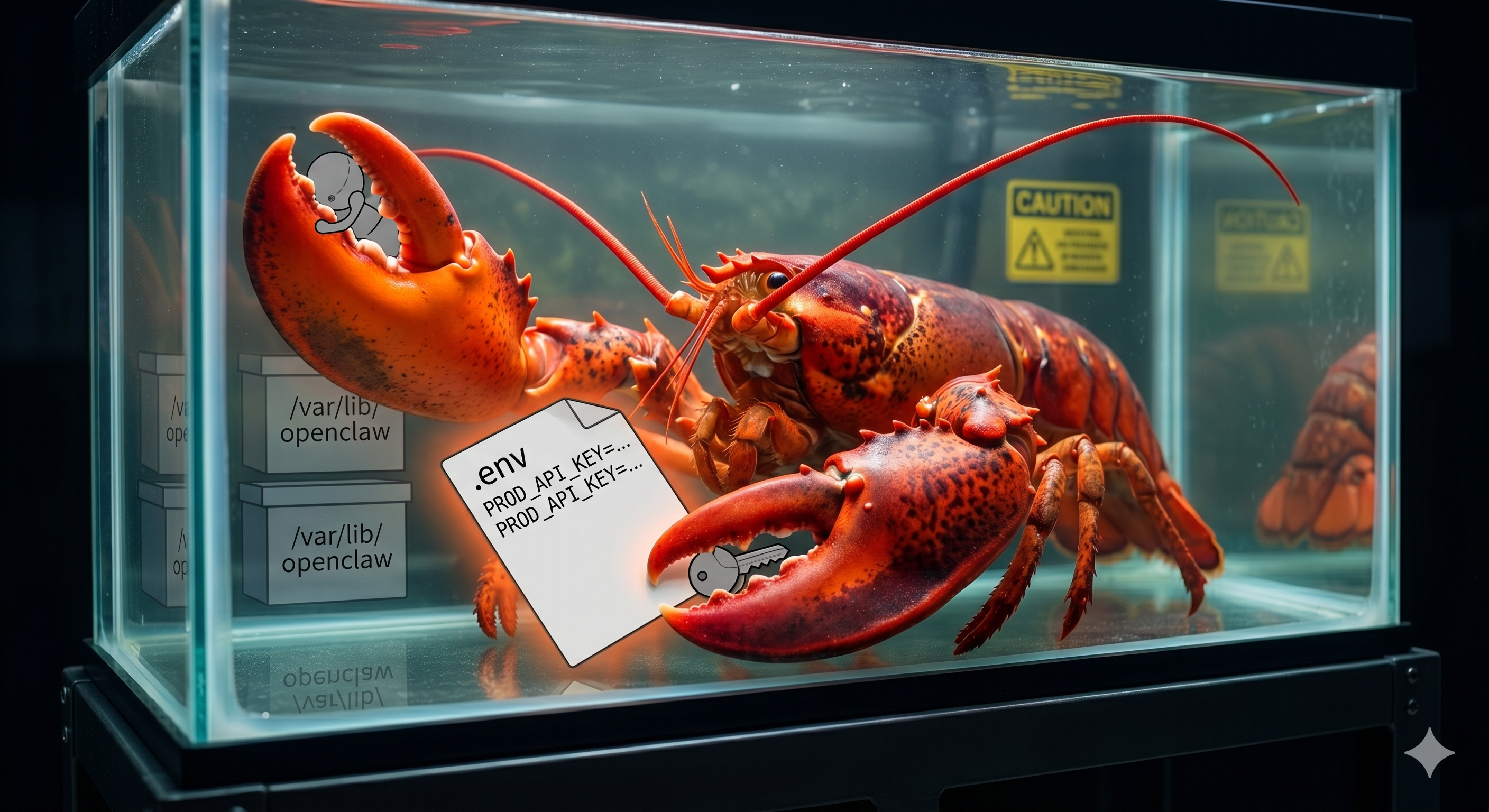
Tank OS puts OpenClaw agents inside rootless Podman and image-managed Fedora patterns, giving platform teams a safer path from laptop experiments to governed fleets.
If you run a platform team, you have probably already had the "so... can we hook this agent up to prod?" conversation. Someone git clones a framework onto their laptop, drops an .env full of real API keys next to it, and points it at Jira, GitHub, email, and internal APIs. It works, but it terrifies anyone responsible for uptime or compliance.
The pattern is always the same: install the "personal AI assistant" or "autonomous agent," give it access to everything you can access, wire it into a browser tab on localhost, and hope your prompt engineering is better than your threat modeling. From the OS's point of view, that agent is just another process running as you, with the same ability to read files, talk to services, and make a mess.
Red Hat's Tank OS is what happens when you approach that situation with a platform brain instead of a hacker brain. It takes OpenClaw, the kind of open-source personal AI assistant your devs are already experimenting with, and puts it inside a purpose-built OS image, running as a rootless Podman workload, with sane defaults around blast radius and lifecycle.
In this post, we will dig into what Tank OS actually is, how it works under the hood, why it makes claw-style agents safer, how to stand up a mini-Tank lab on a Fedora VM, and how the same pattern scales up on OpenShift AI when you are ready to treat agents as first-class workloads in your platform.
The problem: agents loose on laptops
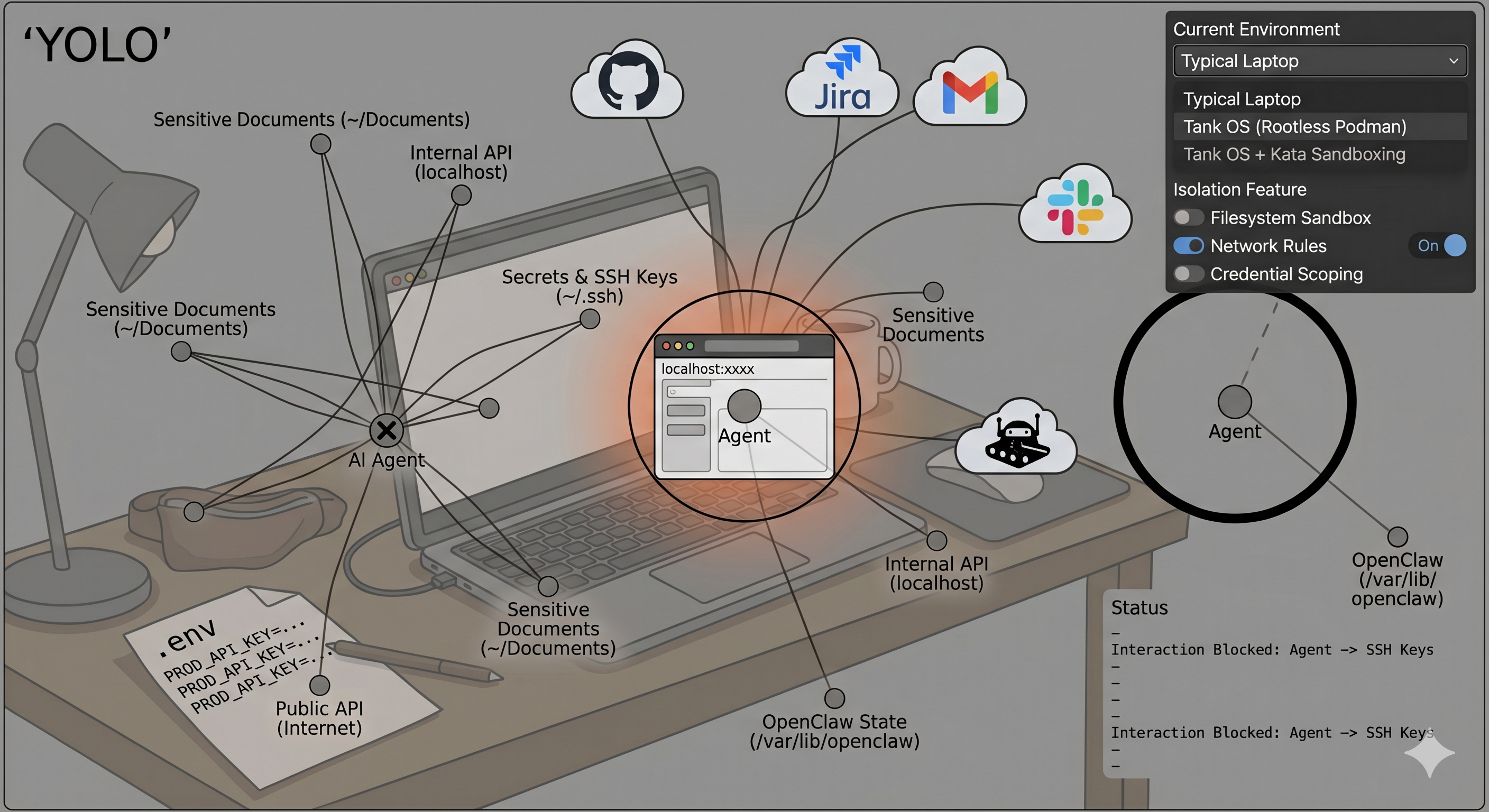
Right now, the default agent deployment story is basically "YOLO with extra steps."
pip installordocker runsome shiny new agent framework.- Paste prod credentials into
.envor into the web UI. - Connect it to email, Slack, GitHub, Jira, internal tools, maybe your CRM.
- Expose a web UI on
localhost:xxxxand call it done.
From the operating system's perspective, your agent is just a regular user process. If you can read a file in your home directory, so can the agent. If you can call a sensitive internal API, so can the agent. If your browser profile lives unencrypted on disk, nothing stops a plugin from rummaging through it.
That is a wild trust model for software whose whole job is: "accept arbitrary natural language instructions and then go and do stuff."
We are missing all the boring infra we take for granted with microservices:
- Isolation by default, not as an afterthought.
- Per-service, scoped credentials instead of one giant
.env. - Image-based upgrades and rollbacks instead of fragile snowflake hosts.
- Centralized policy and observability, not whatever logs someone remembered to add.
Tank OS is an attempt to bolt those properties onto claw-style agents without killing the experimentation vibe.
Introducing Tank OS: an agentic OS for OpenClaw
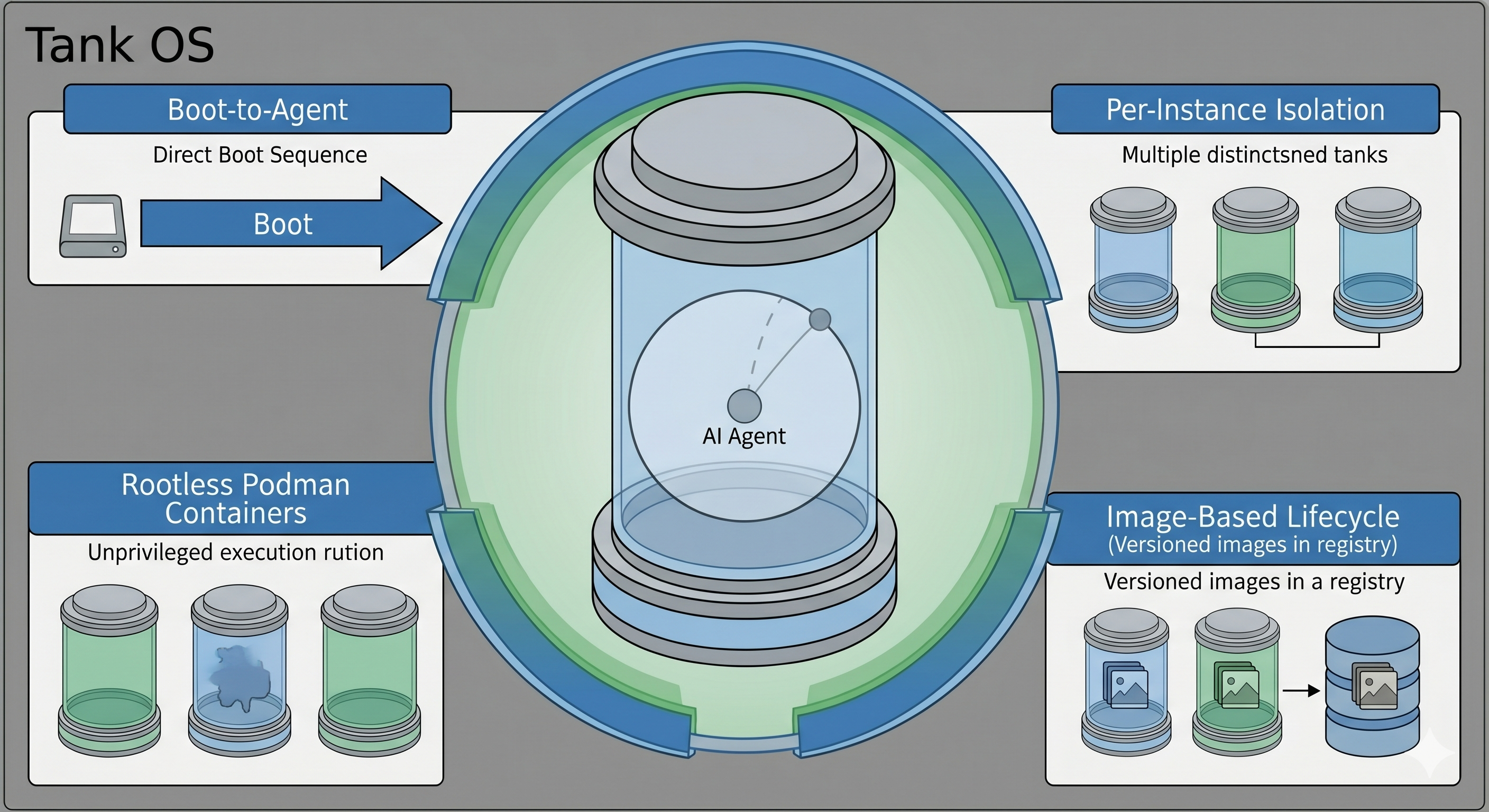
Tank OS is an open-source agentic OS image built by Sally O'Malley, a Red Hat principal software engineer and an OpenClaw maintainer. Instead of "install OpenClaw on some random Linux box," you boot into a Fedora-based image that is purpose-built to run OpenClaw inside rootless Podman containers with opinionated defaults for isolation and state.
At a high level, Tank OS gives you:
- Boot-to-agent: The system boots straight into an OpenClaw instance; the OS exists to host the agent, not to be someone's general-purpose desktop.
- Rootless containers: OpenClaw runs as a rootless Podman container instead of a root process with full system privileges.
- Per-instance isolation: You can run multiple agents on the same machine, each with its own filesystem, config, and credential store.
- Image-based lifecycle: The OS itself can be built and updated with bootc-style image management, so you treat it much more like a container image than a pet VM.
It is aimed at two audiences:
- Power users who want to run OpenClaw locally without letting it rummage through their entire laptop.
- Platform and security teams who know agents are coming and would prefer not to support "whatever your devs installed on their machines this week."
Under the hood: Fedora, bootc, Podman, Quadlet
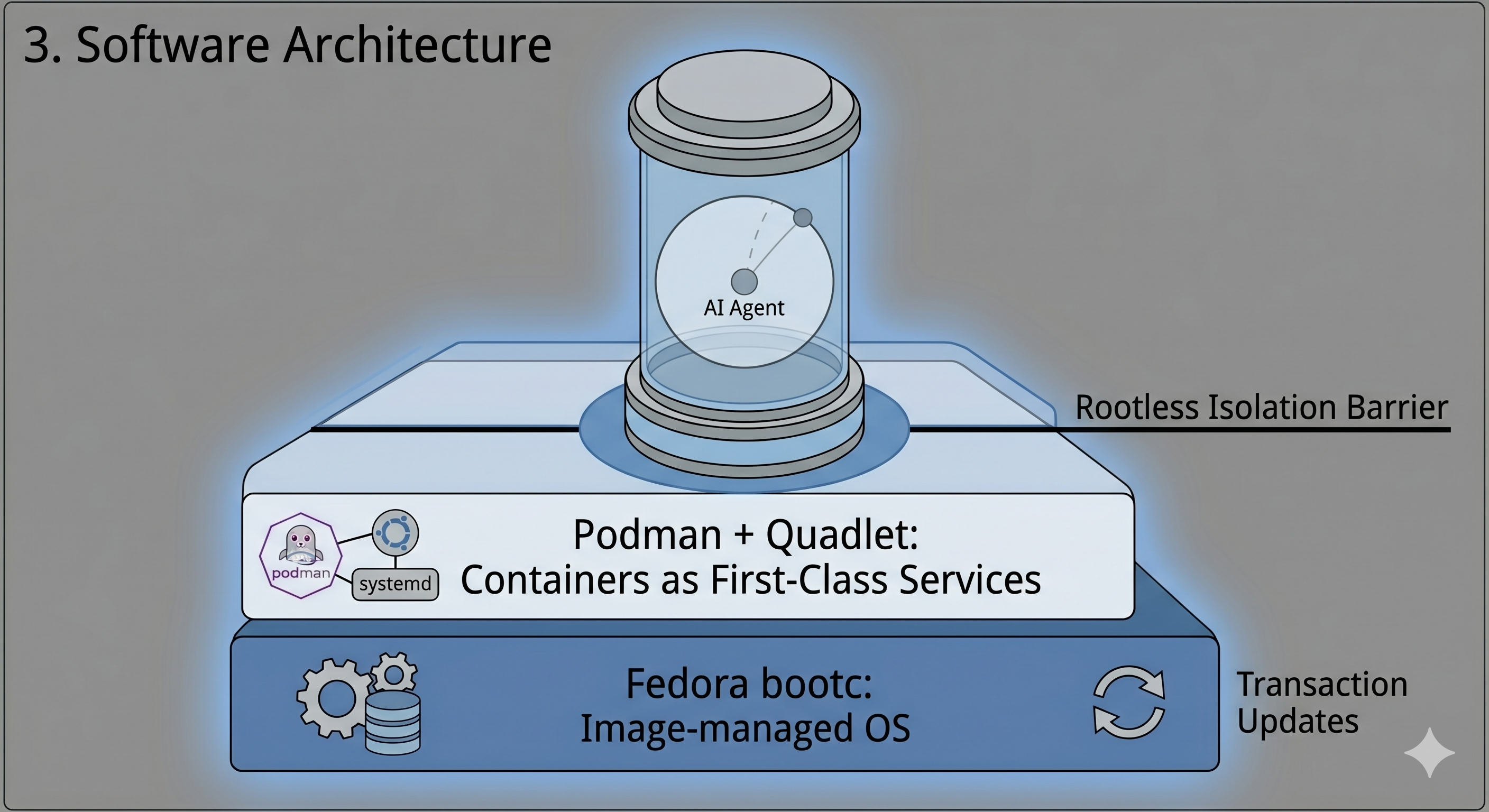
Tank OS does not introduce magical new primitives. It layers together tools Red Hat has been hardening for a while and points them squarely at agents.
Fedora bootc: image-managed OS
The underlying pattern is an image-managed OS using bootc-style tooling:
- You define your OS as a container image, including kernel, base packages, systemd units, and whatever else you need.
- That image can then be turned into a bootable disk image, so your "OS" is just another image digest in a registry.
- Updating the system looks like
bootc upgrade: pull a new image, reboot into it transactionally, and roll back if needed.
Most of the filesystem belongs to the image layer, while per-host state such as agent data, logs, and keys sits on separate writable partitions or volumes. If you are already doing GitOps or image-based control planes, this feels familiar: the OS becomes something you declare and version, not a box you SSH into and dnf upgrade forever.
Podman + Quadlet: containers as first-class services
Tank OS uses Podman for containers and Quadlet to turn those containers into systemd-managed services with minimal ceremony.
The flow looks like this:
- You drop a
.containerfile in~/.config/containers/systemd/for rootless user services or/etc/containers/systemd/for system-wide services. - Quadlet reads those files at boot and auto-generates systemd units that run the described containers.
- Systemd handles lifecycle: starting containers on boot, restarting on failure, and integrating logs with
journalctl.
For OpenClaw, that means "the agent runs as a managed unit" instead of "the script someone started in a terminal three months ago and forgot about."
Rootless by default
Crucially, Tank OS leans on rootless Podman:
- The container processes run as an unprivileged user on the host, not as root.
- The container only sees directories and devices explicitly mounted into it.
- Even if a container boundary fails, the blast radius is much narrower than a privileged agent process on a normal workstation.
Rootless containers are not a silver bullet, but they are a dramatically better starting point than running your agent directly as a privileged process.
Why Tank OS makes agents meaningfully safer
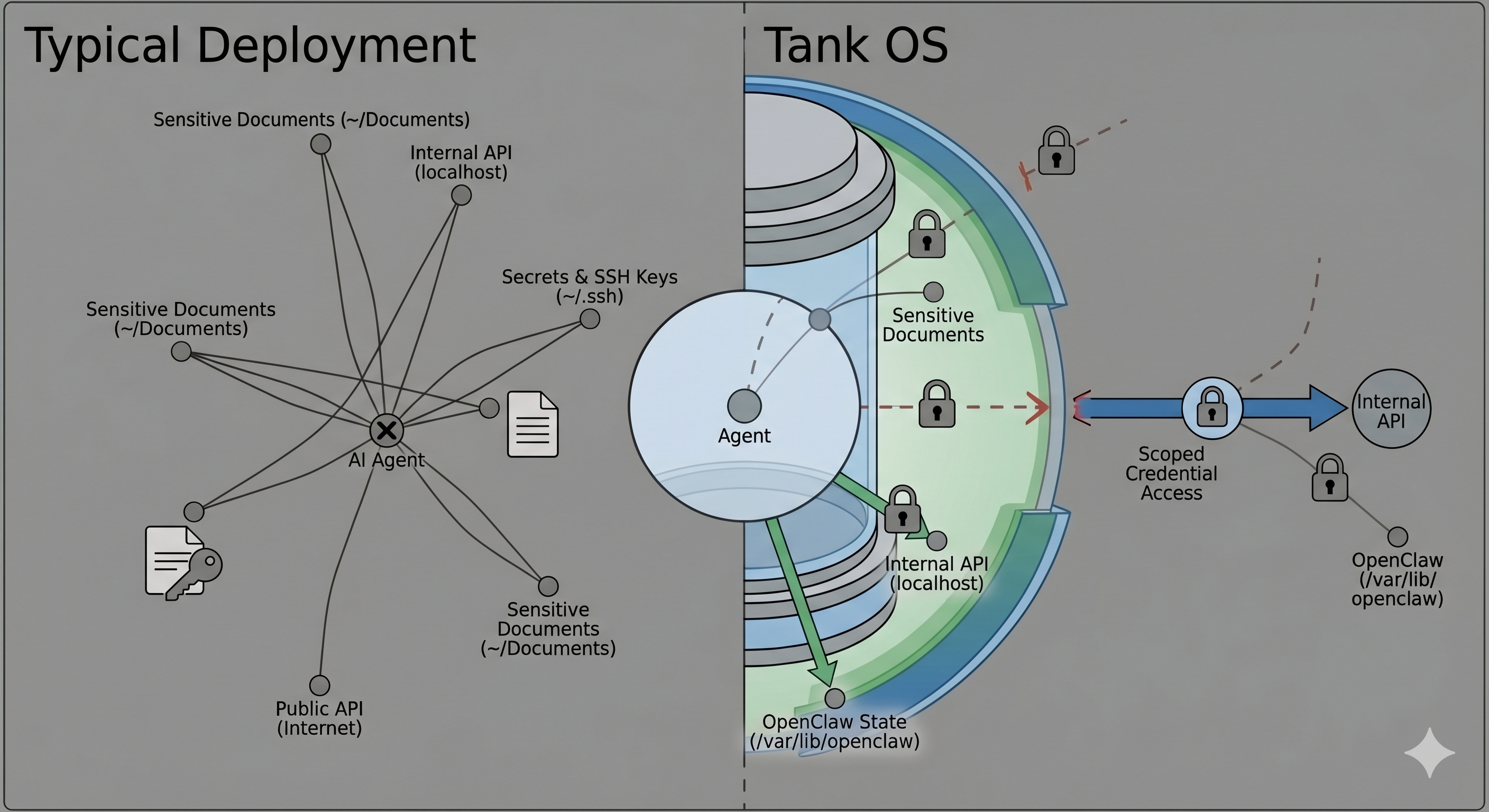
Moving OpenClaw into a tank does not fix hallucinations, prompt injection, or bad business logic. What it does do is give infrastructure a fighting chance to contain the fallout when something goes sideways.
Filesystem and process isolation
On a typical laptop install, OpenClaw runs as you, and anything you can access, it can access. That includes:
- Home directory files such as
~/Documents,~/Downloads, token caches, and SSH keys. - Browser profiles with cookies and saved passwords.
- Any local tools the agent can shell out to.
In a Tank-style setup, the container has its own filesystem namespace, and you only bind-mount what the agent truly needs, usually a small state directory like /var/lib/openclaw plus explicitly approved data sources.
On OpenShift, you can stack this with sandboxed containers based on Kata, so more sensitive agents run in what is effectively a tiny VM with its own kernel via a runtimeClassName switch. Combined with namespaces and cgroups, that gives you a very different model from "Python process on my laptop."
Credential segmentation
In ad-hoc setups, it is common to have one giant .env with LLM keys, Slack tokens, email passwords, CRM API keys, and internal service tokens mixed together. Any misconfigured tool, compromised plugin, or prompt injection can walk away with all of them.
Tank OS encourages a different universe:
- Each OpenClaw instance gets its own config and secrets store.
- Multiple Tank OS instances on a single host do not share those stores by default.
- In cluster deployments, agents get short-lived, scoped tokens via service accounts, SPIFFE/SPIRE, or other identity systems, and those tokens are scoped by policy at the gateway.
Now the question is not "does this agent have prod keys?" It is "what can this token do?" And that is something you can enforce centrally.
Fleet-level control and policy
The last big shift is from "one dev's pet agent" to "a fleet of agents."
Tank OS and OpenShift AI give you the usual platform primitives:
- Versioned images, staged rollouts, and rollbacks when something breaks.
- Namespaces, RBAC, and NetworkPolicy to segment agents by tenant or domain.
- Service mesh and gateway policy for per-service routing, authentication, and authorization.
Combine that with MCP Gateway fronting your tool servers, plus Kuadrant AuthPolicy and OPA rules, and you get tool-level governance: which agent can call which tool with what scopes. Prompt injection can still ask an agent to "call this forbidden tool," but the gateway can simply refuse.
Tank OS lab: build a mini-tank on Fedora
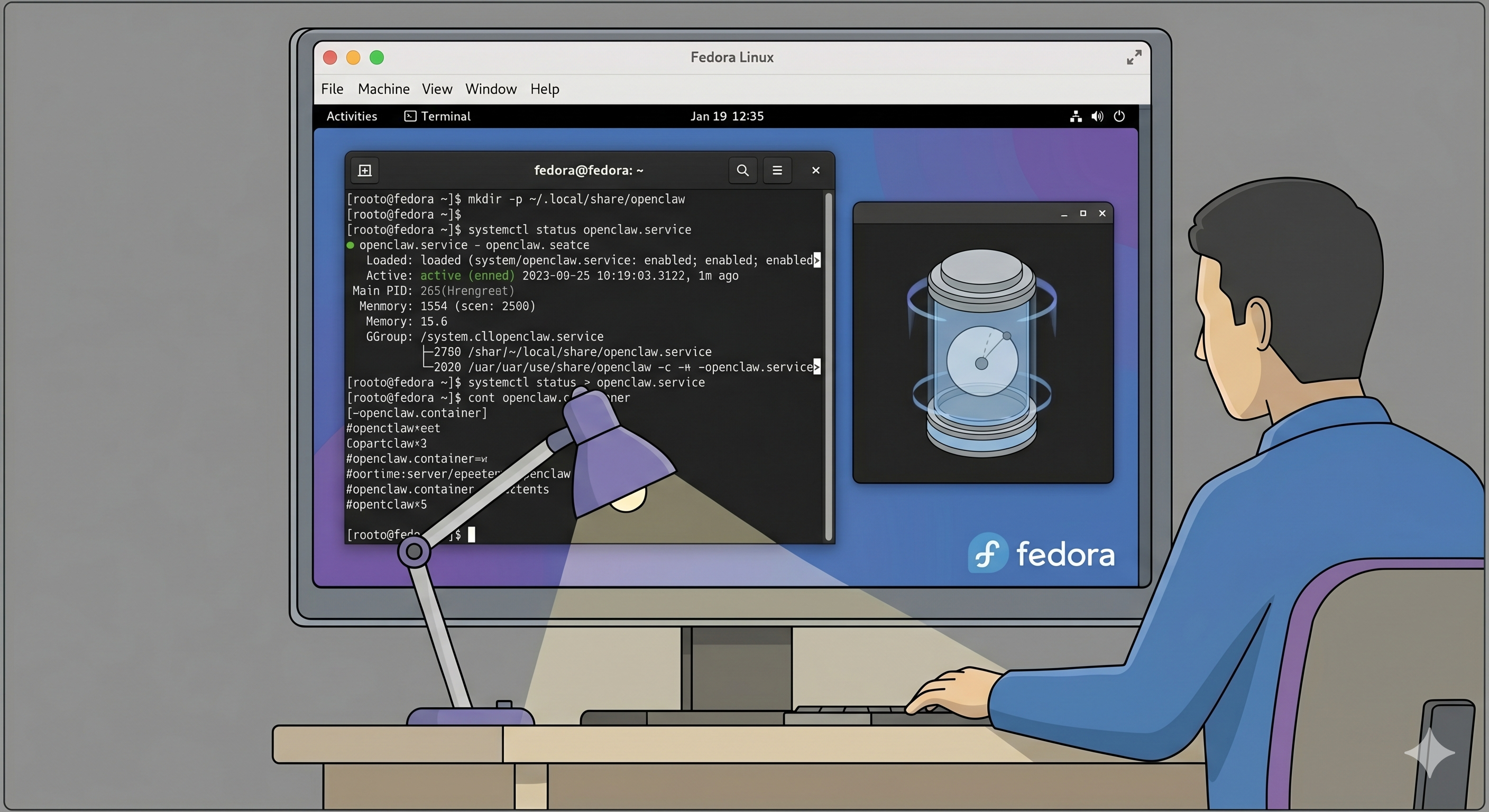
Before you worry about bootc images and OpenShift, it is worth feeling what this looks like on a single host. Here is a lab you can run on a Fedora Workstation or Server VM.
Assumptions:
- Fedora 40+ VM or bare metal with systemd and SELinux enforcing.
- Rootless Podman installed.
- Access to an OpenClaw container image, either yours or a community build.
Step 0: Update Fedora and install Podman
sudo dnf -y update
sudo dnf -y install podman
Sanity-check rootless Podman:
podman info --log-level=error
podman run --rm quay.io/podman/hello
You should be able to run containers as your regular user without sudo.
Step 1: Create a state directory for OpenClaw
Give the agent a small, explicit sandbox rather than your entire home directory:
mkdir -p ~/.local/share/openclaw
chmod 700 ~/.local/share/openclaw
You will mount this directory into the container at /var/lib/openclaw so OpenClaw can persist config, logs, and local databases.
Step 2: Write a Quadlet .container file
Rootless Quadlet files live under ~/.config/containers/systemd.
mkdir -p ~/.config/containers/systemdCreate ~/.config/containers/systemd/openclaw.container:
# ~/.config/containers/systemd/openclaw.container

[Unit]
Description=OpenClaw agent (rootless Podman via Quadlet)
After=network-online.target
Wants=network-online.target

[Container]
# Replace with your actual OpenClaw image
Image=quay.io/yourorg/openclaw:latest
ContainerName=openclaw

# Bind the web UI to localhost only
PublishPort=127.0.0.1:11434:11434

# Persist OpenClaw state and config
Volume=%h/.local/share/openclaw:/var/lib/openclaw:Z

# Env vars for OpenClaw configuration
Env=OPENCLAW_CONFIG=/var/lib/openclaw/config.yaml
Env=OPENCLAW_ENV=prod

# Optional: enable registry-based auto-update
AutoUpdate=registry

[Service]
Restart=always
RestartSec=5
TimeoutStartSec=900

[Install]
WantedBy=default.target
A few key details matter:
Volume=...:Ztells SELinux to relabel that directory so containers can access it safely.- Binding to
127.0.0.1keeps the agent UI off your LAN; put a reverse proxy or VPN in front later if you need remote access. AutoUpdate=registrypositions you for image-based upgrades; Podman can periodically check the registry for a new image and restart the service.
Step 3: Turn it into a managed service
Reload user-level systemd and start the service:
systemctl --user daemon-reload
systemctl --user enable --now openclaw.service
systemctl --user status openclaw.service
On modern Fedora, you also want user services to keep running after you log out:
loginctl enable-linger "$(whoami)"Now OpenClaw behaves like a first-class service: it starts at boot, restarts if it crashes, and exposes logs through journalctl --user -u openclaw.service.
Step 4: Connect only to safe tools, for now
Resist the urge to give this lab instance keys to prod.
Start with:
- A staging GitHub org or test repos.
- A test email inbox.
- Synthetic tickets in a sandbox Jira or Linear project.
Configure OpenClaw to talk only to those. Yes, it is slightly less magical than "it manages my real inbox," but it forces you to think about what permissions the agent actually needs and how you would scope them.
Make a note as you go: which APIs did it need, and at what access level? Those notes become policy when you graduate to OpenShift.
Step 5: Optional network guardrails
Even on a single machine, you can start playing with infrastructure-level guardrails:
- Use firewalld or nftables to restrict outbound connections from your Tank host to your LLM providers, internal APIs, and registries.
- Do not expose OpenClaw's UI on
0.0.0.0; keep it on localhost and front it with a reverse proxy such as Caddy, Nginx, or Traefik with authentication if you really need remote access.
The goal is not perfection. The goal is to experience a world where the infra, not just the prompt, constrains what the agent can do.
Scaling up: Tank-style agents on OpenShift AI
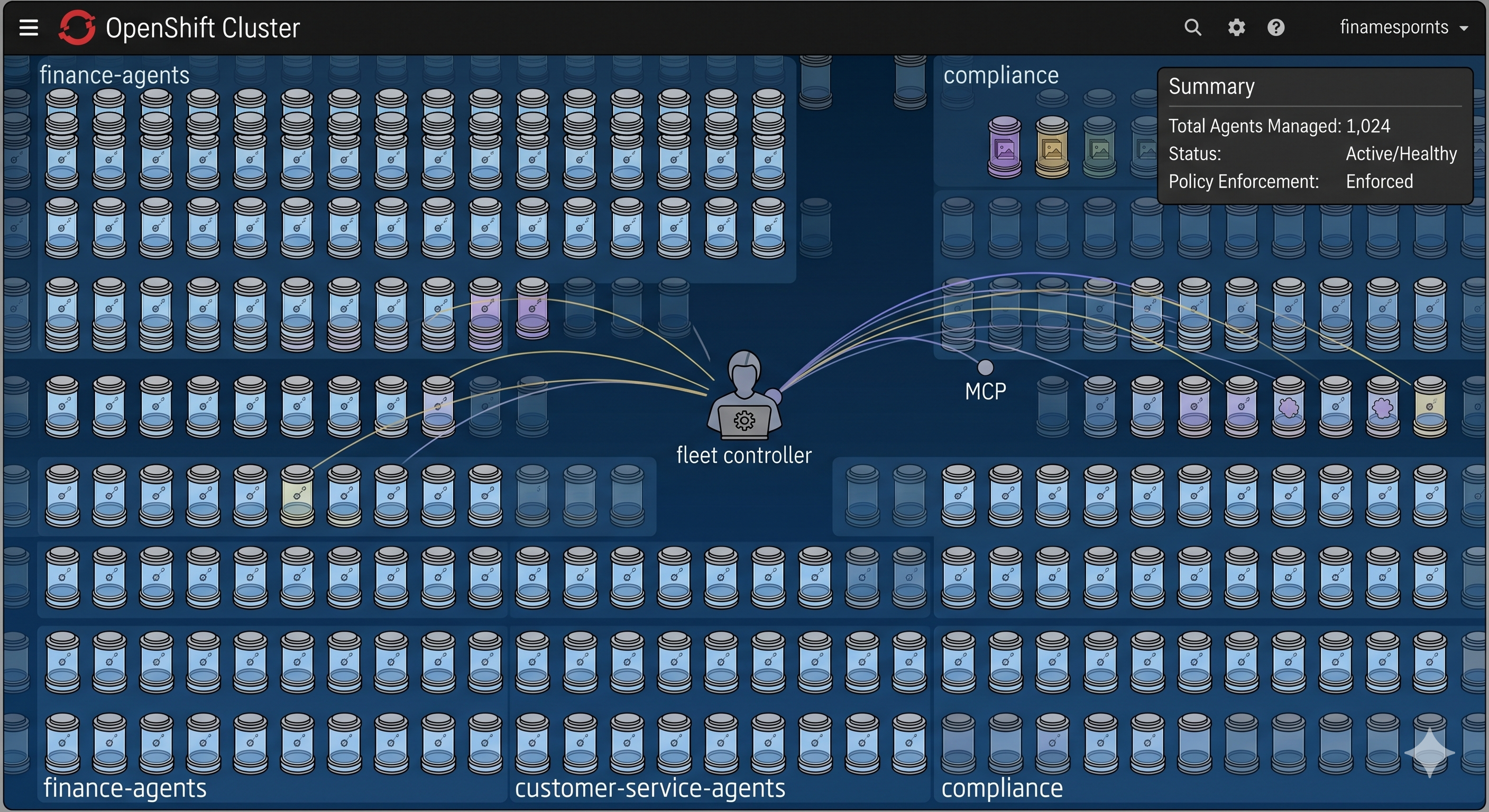
If you are already running OpenShift or ROSA, the interesting version of Tank OS is not "a single VM that boots OpenClaw." It is "a repeatable pattern for running claw-style agents in the cluster with identity, policy, and sandboxing."
A Red Hat-flavored pattern looks like this:
- OpenClaw or a similar agent runs as a pod in a dedicated namespace, with non-root UID and a read-only root filesystem.
- Kagenti, an open-source agent control plane, discovers that pod, wraps it in an
AgentRuntime, and layers in identity and governance. - An MCP Gateway sits in front of tools, enforcing tool-level access through Kuadrant AuthPolicy and OPA rules.
- OpenShift sandboxed containers based on Kata give you a
runtimeClassNameswitch that can turn more sensitive agents into pods with VM-backed isolation.
Here is how that looks in YAML.
1. Namespace and ServiceAccount for agents
Start with isolation at the namespace level:
apiVersion: v1
kind: Namespace
metadata:
  name: agents
  labels:
    istio-injection: enabled
---
apiVersion: v1
kind: ServiceAccount
metadata:
  name: openclaw-sa
  namespace: agents
This is the identity anchor your platform policies can reason about.
2. OpenClaw deployment with optional Kata sandboxing
Now a Deployment that mirrors the Quadlet setup but runs in the cluster:
apiVersion: apps/v1
kind: Deployment
metadata:
  name: openclaw-agent
  namespace: agents
  labels:
    app: openclaw-agent
spec:
  replicas: 1
  selector:
    matchLabels:
      app: openclaw-agent
  template:
    metadata:
      labels:
        app: openclaw-agent
    spec:
      serviceAccountName: openclaw-sa
      # Uncomment if OpenShift sandboxed containers (Kata) are installed
      # runtimeClassName: kata
      containers:
        - name: openclaw
          image: quay.io/yourorg/openclaw:latest
          imagePullPolicy: IfNotPresent
          ports:
            - containerPort: 11434
              name: http
          env:
            - name: OPENCLAW_ENV
              value: prod
            - name: OPENCLAW_CONFIG
              value: /var/lib/openclaw/config.yaml
            - name: MCP_URL
              value: https://mcp-gateway.apps.example.com/mcp
          securityContext:
            runAsNonRoot: true
            allowPrivilegeEscalation: false
            readOnlyRootFilesystem: true
          volumeMounts:
            - name: state
              mountPath: /var/lib/openclaw
      volumes:
        - name: state
          emptyDir: {}
Two things to call out:
runtimeClassName: katais the one-line switch that moves this agent into Kata-backed isolation if you have OpenShift sandboxed containers installed.MCP_URLis a single endpoint where the tools live; OpenClaw does not need to know about every individual tool server.
3. Lock down egress with NetworkPolicy
You can enforce the idea that "agents talk only to MCP and maybe your model provider" with a NetworkPolicy:
apiVersion: networking.k8s.io/v1
kind: NetworkPolicy
metadata:
  name: openclaw-egress
  namespace: agents
spec:
  podSelector:
    matchLabels:
      app: openclaw-agent
  policyTypes:
    - Egress
  egress:
    - to:
        - namespaceSelector:
            matchLabels:
              gateway: mcp
          podSelector:
            matchLabels:
              app: mcp-gateway
      ports:
        - protocol: TCP
          port: 8443
    - to:
        - ipBlock:
            cidr: 203.0.113.0/24
      ports:
        - protocol: TCP
          port: 443
Now even if the agent gets prompt-injected into "curl this random domain and POST my secrets there," the platform refuses. The only reachable destinations are the MCP Gateway and your model provider range.
4. MCP Gateway and Kuadrant policy: tool-level control
MCP Gateway is an Envoy-based gateway that can aggregate MCP servers under one endpoint. Kuadrant AuthPolicy and OPA can then enforce who can call what.
A simplified policy pattern looks like this:
apiVersion: kuadrant.io/v1
kind: AuthPolicy
metadata:
  name: mcp-auth
  namespace: gateway-system
spec:
  targetRef:
    group: gateway.networking.k8s.io
    kind: Gateway
    name: mcp-gateway
    sectionName: mcp
  rules:
    authentication:
      keycloak:
        jwt:
          issuerUrl: https://keycloak.example.com/realms/mcp
    authorization:
      tool-access:
        opa:
          rego: |
            allowed_tools := {t |
              server := input.auth.identity.resource_access[input.request.host]
              t := server.roles[_]
            }
            allow {
              input.request.headers["x-mcp-toolname"] == tool
              tool := allowed_tools[_]
            }
For agents, the key takeaway is this: the agent calls MCP with a token, and the gateway uses that token to decide which tools are allowed. Prompt injection that tries to call unauthorized tools gets stopped at the gateway instead of relying on the agent's judgment.
5. Kagenti: turning agents into a managed fleet
Kagenti is the emerging control plane that makes agents feel like first-class citizens in your cluster.
It is designed to:
- Use
AgentRuntimeandAgentCardresources so you do not maintain an out-of-band registry. - Expose metadata about what agents are running, where they are, what they can do, and how they are configured.
- Layer in identity, tracing, and policy so promotion, retirement, and access changes are platform operations, not local scripts.
You keep building agents with whatever frameworks make sense: OpenClaw, LangGraph, CrewAI, or custom assistants. Kagenti discovers them as Kubernetes workloads and wires them into the governance stack.
If you are a platform team, this is the shape you want: agents as deployed workloads with metadata, identity, and policy, not notebooks running under someone's home directory.
Where Tank OS fits right now
Tank OS is new, but it is already a useful building block.
Today, it is a solid fit for:
- Safer tinkering: If you would otherwise point an agent at your real inbox "just to see," doing it in a tank is significantly less reckless.
- Enterprise pilots: Platform and security teams who know agents are coming can use Tank-style setups to prototype patterns before they have to support them across the fleet.
- Edge and appliances: Kiosks, branch servers, and other on-prem boxes where the entire job of the device is "run this agent on a managed image," with image-based updates and minimal drift.
What it is not yet:
- A one-click installer for non-technical users.
- A cure-all for prompt injection, hallucinations, or bad integrations.
It is infrastructure. It narrows the blast radius when the application-level stuff goes wrong, which is exactly what good infrastructure should do.
The future of claw agents and agentic OS
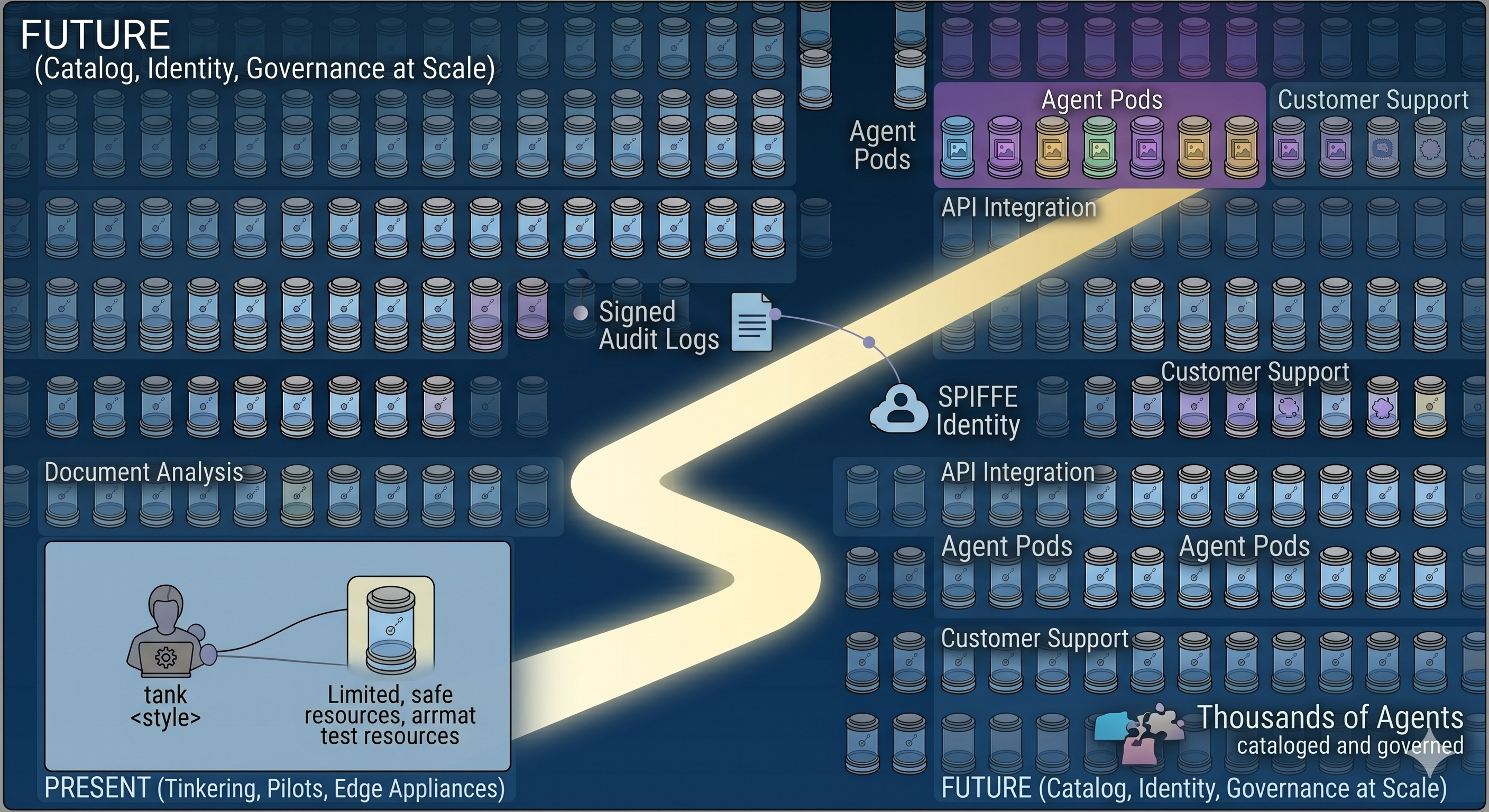
The interesting part here is not "one better way to run OpenClaw." It is what happens when we have thousands or millions of claw-style agents instead of one bot per laptop.
Red Hat's own writing around OpenClaw, Kagenti, and agentic AI makes it clear they are thinking in those terms: agents discovered, cataloged, and governed at scale, not installed by hand on random machines.
A few trends feel inevitable:
- Agent identity and audit: SPIFFE/SPIRE-backed identities per agent, signed logs, and clear "who did what when" trails, just like you would expect from any critical service.
- Agent catalogs: Internal app stores where teams can request agents with specific capabilities, while platform and security teams approve them based on policy.
- Lifecycle controllers: Operators like Kagenti that handle discovery, evaluation, promotion, and decommissioning the same way we already handle microservices and operators.
- Richer sandboxes: Environments where you can dial trust up or down, from a read-only docs bot to an agent that can touch production with supervision, with infra enforcing the limits.
- Hybrid runtimes: OpenResponses-conformant APIs running on your infrastructure so agents keep their familiar chat-and-tools programming model while you keep data and policy local.
If you squint a bit, Tank OS looks less like a one-off weekend project and more like a concrete prototype of what agent-centric operating systems will look like when we take them seriously.
Right now, the smart move probably is not "rebuild your whole fleet around Tank OS." The smart move is to start a lab, put your agents in a tank, wire at least one of them into OpenShift AI or your Kubernetes platform with MCP Gateway and NetworkPolicy, and learn what happens when you treat agents as infrastructure instead of clever scripts.
And if you are already running OpenShift, ROSA, or another Kubernetes platform and you know agents are coming, this is the moment to define your agentic OS pattern instead of inheriting whatever your teams spin up on laptops. Tank OS, Kagenti, and MCP Gateway are one opinionated path; there are others.
If you want help designing that pattern for your environment - images, policies, gateways, and safety checks baked in from day one - that is exactly the kind of work I enjoy doing with teams who want to move fast and sleep at night.
Sources and further reading
- TechCrunch: Red Hat's OpenClaw maintainer just made enterprise Claw deployments a lot safer
- Red Hat Developer: Deploying agents with Red Hat AI: The curious case of OpenClaw
- Red Hat Developer: Advanced authentication and authorization for MCP Gateway
- Podman documentation: Quadlet and systemd units
- Red Hat documentation: Managing bootc images
- Red Hat documentation: OpenShift sandboxed containers user guide



Discussion
0Join the conversation
Sign in with your Google account to participate in the discussion, ask questions, and share your insights.